A Powerful Tool for JavaScript Performance — Web Worker
Introduction
Web Worker is a concept introduced in HTML5. It comes in two types: Dedicated Web Workers and Shared Web Workers. A dedicated worker can only be used by the script that created it (one dedicated worker corresponds to one main thread), while a shared worker can be used across different scripts (one shared worker corresponds to multiple main threads).
The dedicated worker can be regarded as the default kind of Web Worker; the modifier exists only to distinguish it from the shared worker. This article keeps a rather strict distinction between the two, which may feel verbose, but I personally think it is necessary. Wherever the plain term Web Worker appears, it refers to cases that apply to both.
Use Cases
The point of Web Workers is that they let you strip time-consuming data-processing operations out of the main thread, so that the main thread can focus on page rendering and interaction.
- Lazy loading
- Text analysis
- Streaming media data processing
- canvas graphics drawing
- Image processing
- …
Things to Note
- Subject to the same-origin restriction
- Cannot access DOM nodes
- Runs in a separate context and cannot use the Window object
- A running Web Worker does not affect the main thread, but when interacting with the main thread it is still constrained by the main thread’s single-threaded bottleneck. In other words, if the worker thread interacts with the main thread frequently, the main thread — having to handle those interactions — can still end up blocking the page
- A shared worker can be invoked by multiple browsing contexts, but all of those browsing contexts must have the same origin (same protocol, host, and port number)
Browser Support
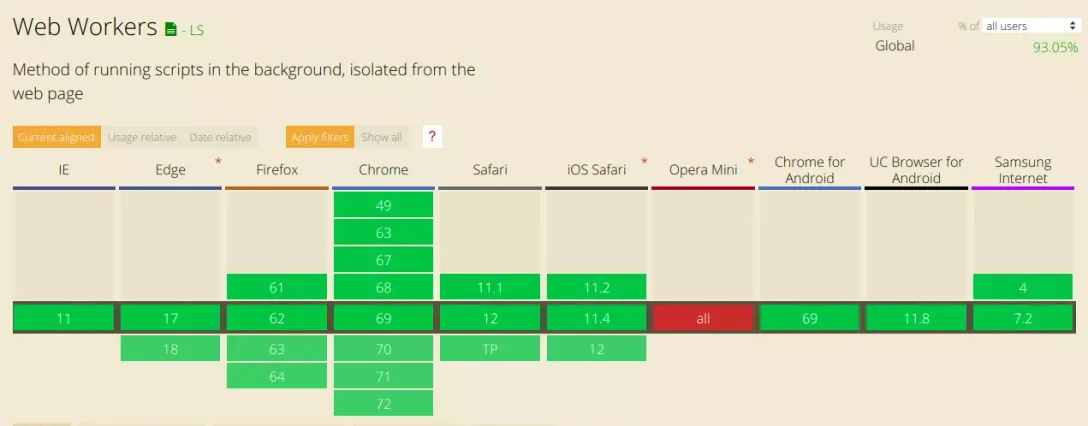
According to statistics from the Can I Use website, about 93.05% of browsers currently support dedicated workers.
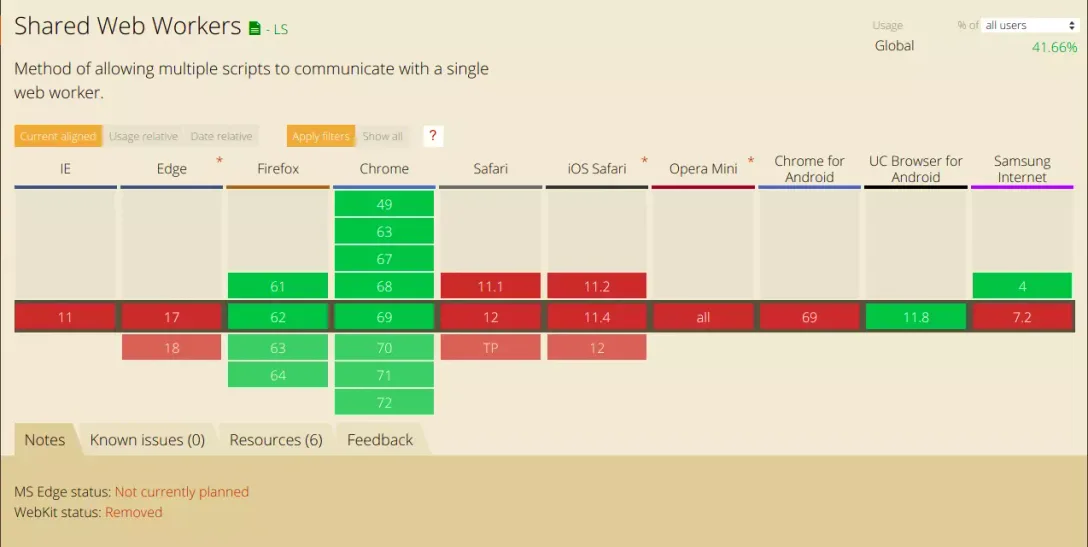
For shared workers, only about 41.66% of browsers provide support.
Since the constructors of both dedicated and shared workers live on the window object, we can check for browser support before using either of them.
if (window.Worker) {
    // ...
}
if (window.SharedWorker) {
// ...
}Creating Workers
A dedicated worker is created with the Worker() method, which accepts two arguments: the first, required one is the location of the script; the second is an optional configuration object in which the type, credentials, and name properties can be specified.
var worker = new Worker('worker.js')
// var worker = new Worker('worker.js', { name: 'dedicatedWorker'})
A shared worker is created with the Shared Worker() method, which likewise takes two arguments, used the same way as Worker().
var sharedWorker = new SharedWorker('shared-worker.js')Note that because Web Workers are subject to the same-origin restriction, local debugging also has to go through a local server; opening a page directly over the file:// protocol will throw an exception.
Passing Data
Both the worker thread and the main thread send messages via the postMessage() method and receive messages via the onmessage event. In this process the data is not shared but copied. Note that Error and Function objects cannot be copied by the structured clone algorithm; attempting to do so throws a DATA_CLONE_ERR exception. Also, postMessage() can only send one object at a time — if you need to send multiple arguments, wrap them in an array or an object before passing them along.
postMessage() and the structured clone algorithm are discussed at the end of this article.
Below is an example of data passing with a dedicated worker.
// 主线程
var worker = new Worker('worker.js')
worker.postMessage([10, 24])
worker.onmessage = function(e) {
    console.log(e.data)
}

// Worker 线程
onmessage = function (e) {
    if (e.data.length > 1) {
        postMessage(e.data[1] - e.data[0])
    }
}
In the worker thread, both self and this refer to the worker thread’s global object. For listening to the message event, the following four forms are equivalent.
// 写法 1
self.addEventListener('message', function (e) {
    // ...
})

// 写法 2
this.addEventListener('message', function (e) {
    // ...
})

// 写法 3
addEventListener('message', function (e) {
    // ...
})

// 写法 4
onmessage = function (e) {
    // ...
}
The main thread accesses dedicated and shared workers through a MessagePort. A dedicated worker’s port is set up automatically when the worker is created and is never exposed. Unlike dedicated workers, a shared worker’s port must be opened before messages can be passed. MDN’s description of the start() method on MessagePort reads:
Starts the sending of messages queued on the port (only needed when using EventTarget.addEventListener; it is implied when using MessagePort.onmessage.)
Testing bears this out: the start() method goes hand in hand with addEventListener. If we choose onmessage for event listening, the start() method is called implicitly.
// 主线程
var sharedWorker = new SharedWorker('shared-worker.js')
sharedWorker.port.onmessage = function(e) {
    // 业务逻辑
}
var sharedWorker = new SharedWorker('shared-worker.js')
sharedWorker.port.addEventListener('message', function(e) {
// 业务逻辑
}, false)
sharedWorker.port.start() // 需要显式打开When passing messages, the postMessage() method and the onmessage event must be invoked through the port object. In addition, in the worker thread you need to listen for port changes with the onconnect event and respond with the port’s message handler.
// 主线程
sharedWorker.port.postMessage([10, 24])
sharedWorker.port.onmessage = function (e) {
    console.log(e.data)
}

// Worker 线程
onconnect = function (e) {
    let port = e.ports[0]

    port.onmessage = function (e) {
        if (e.data.length > 1) {
            port.postMessage(e.data[1] - e.data[0])
        }
    }
}
Closing a Worker
A worker can be closed with the terminate() method on the main thread, or with the close() method inside the worker thread. The two methods are equivalent, but the recommended usage is close(), to guard against accidentally shutting down a worker thread that is still running. Once the worker thread is closed, the worker will no longer respond.
// 主线程
worker.terminate()

// Dedicated Worker 线程中
self.close()

// Shared Worker 线程中
self.port.close()
Error Handling
Errors can be handled by setting the onerror and onmessageerror callbacks on the main thread or in the worker thread. onerror runs when the worker’s error event fires and bubbles; onmessageerror fires when a message received by the worker cannot be deserialized (I tried and found no way to trigger the onmessageerror event — if you use the postMessage method in a worker thread to pass an Error or Function object, it gets caught by onerror first because it cannot be serialized, and it never reaches the deserialization stage at all).
// 主线程
worker.onerror = function () {
    // ...
}

// 主线程使用专用线程
worker.onmessageerror = function () {
    // ...
}

// 主线程使用共享线程
worker.port.onmessageerror = function () {
    // ...
}

// worker 线程
onerror = function () {

}
Loading External Scripts
Web Workers provide the importScripts() method, which can load external script files into the worker.
importScripts('script1.js')
importScripts('script2.js')

// 以上写法等价于
importScripts('script1.js', 'script2.js')
Sub-workers
A worker can spawn sub-workers, but two things need to be noted.
- Sub-workers must have the same origin as the parent page
- URIs in a sub-worker are resolved relative to the location of the parent worker
Embedded Workers
There is currently no kind of tag that lets worker code be embedded in a page the way a <script> element is, but we can use Blob() to parse the worker code sitting in the page.
<script id="worker" type="javascript/worker">
// 这段代码不会被 JS 引擎直接解析,因为类型是 'javascript/worker'

// 在这里写 Worker 线程的逻辑
</script>
<script>
    var workerScript = document.querySelector('#worker').textContent
    var blob = new Blob([workerScript], {type: "text/javascript"})
    var worker = new Worker(window.URL.createObjectURL(blob))
</script>
About postMessage
In Web Workers, the worker thread and the main thread communicate data using the structured clone algorithm. The structured clone algorithm builds a clone by recursively traversing the input object, and it avoids infinite traversal loops by keeping a map of references it has already visited. You can think of the process as the sending side serializing the argument with something like JSON.stringfy(), and the receiving side deserializing it with something like JSON.parse().
However, a single data transfer has to go through both serialization and deserialization, and with a large amount of data this process itself can cause performance problems. That is why the concept of Transferable Objects was introduced for workers: when the data is large, we can choose to hand data from the main thread over to the worker thread directly. Note that this transfer is complete — once the data has been successfully transferred, the main thread can no longer access it. The handover itself still goes through postMessage.
postMessage(message, transferList)For example, transferring an ArrayBuffer object:
let aBuffer = new ArrayBuffer(1)
worker.postMessage({ data: aBuffer }, [aBuffer])
Context
A worker runs in a WorkerGlobalDataScope context. Every WorkerGlobalDataScope object has a different event loop. This event loop has no browsing context associated with it, and its task queue holds only events, callbacks, and networking activity.
Every WorkerGlobalDataScope has a closing flag. When this flag is set to true, the task queue will discard any tasks that try to join it afterwards; tasks already in the queue are unaffected (unless otherwise specified). At the same time, timers stop working, and all pending background tasks are deleted.
Functions and Classes Available in Workers
Because a worker’s context differs from an ordinary browsing context, it cannot access window or window-related APIs, nor can it manipulate the DOM directly. Workers provide the WorkerNavigator and WorkerLocation interfaces, which are subsets of window’s Navigator and Location respectively. Beyond those, workers also provide interfaces covering time, storage, networking, drawing, and more; some of them are listed below, and for more interfaces you can refer to the MDN documentation.
Time-related
- clearInterval()
- clearTimeout()
- setInterval()
- setTimeout
Worker-related
- importScripts()
- close()
- postMessage()
Storage-related
- Cache
- IndexedDB
Network-related
- Fetch
- WebSocket
- XMLHttpRequest
Related Links
References
- Using Web Workers - Web APIs | MDN
- Worker | MDN
- MessagePort | MDN
- HTML Standard - Web workers
- The Basics of Web Workers
Comments
Sign in with GitHub to leave a comment. View discussions on GitHub ↗