How V8 Works — Object Representation in V8
This article was tested on Chrome 73.
Preface
V8 may well be a field that frontend developers find both familiar and unfamiliar.
By the time you read this article, it has already gone through three revisions. There is only one goal: to present the material in a more intuitive way, while staying as accurate as possible, so that it is easier to take in. This article does not require much background knowledge — you only need a basic understanding of JavaScript objects.
To keep the article from being too dry, and to back up the accuracy of its claims, it includes many small experiments that you are welcome to play around with in the console.
Preliminaries — Viewing Memory Snapshots in Chrome
First, run the following program in the console.
function Food(name, type) {
  this.name = name;
  this.type = type;
}
var beef = new Food('beef', 'meat');
Switch to the Memory panel and click the little circle on the left to capture a snapshot of the current memory.
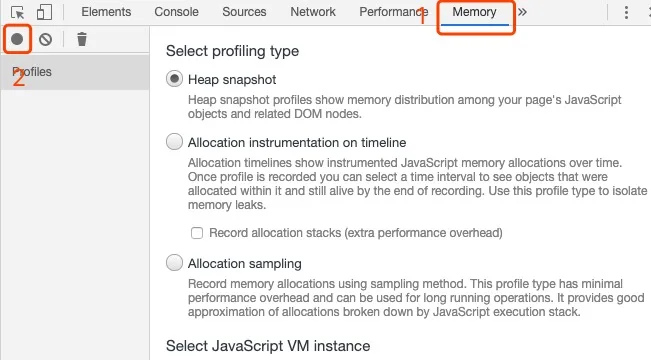
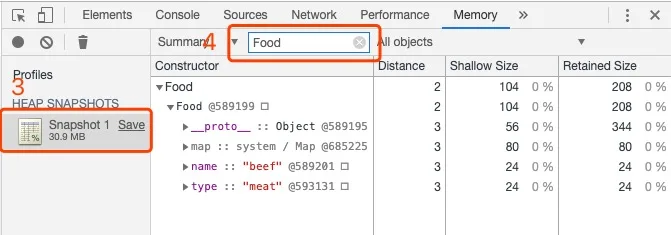
Creating objects through a constructor is mainly to make them easier to find in the snapshot. Once you open the snapshot, type Food into the filter and you can find every object constructed by Food. Magical, right.
The Structure of Objects in V8
In V8, an object mainly consists of three pointers: the hidden class, Property, and Element.
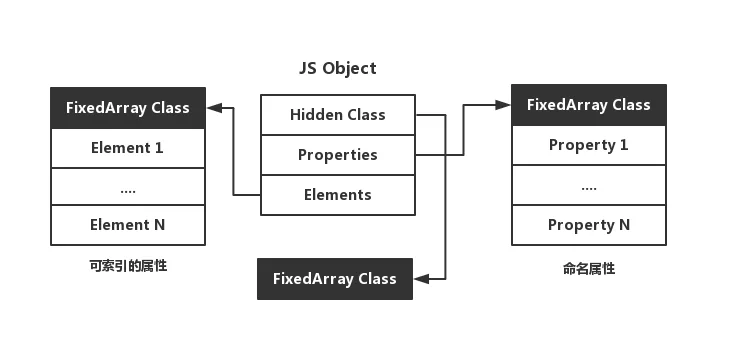
The hidden class describes the structure of the object. Property and Element hold the object’s properties, and the difference between them mainly comes down to whether the key can be used as an index.
Property vs. Element
// 可索引属性会被存储到 Elements 指针指向的区域
{ 1: "a", 2: "b" }

// 命名属性会被存储到 Properties 指针指向的区域
{ "first": 1, "second": 2 }
In fact, this design exists to satisfy the requirements of the ECMA specification. According to the spec, indexed properties should be arranged in ascending order by index value, while named properties should be arranged in ascending order of creation.
Let’s do a simple little experiment.
var a = { 1: "a", 2: "b", "first": 1, 3: "c", "second": 2 }

var b = { "second": 2, 1: "a", 3: "c", 2: "b", "first": 1 }

console.log(a)
// { 1: "a", 2: "b", 3: "c", first: 1, second: 2 }

console.log(b)
// { 1: "a", 2: "b", 3: "c", second: 2, first: 1 }
The difference between a and b is that a begins with an indexed property while b begins with a named property. In a, the indexed properties are in ascending order, and the named property first comes before second. In b, the indexed properties are out of order, and the named property second comes before first.
You can see:
- Indexed properties are arranged in ascending order by index value, while named properties are arranged in ascending order of creation.
- When both indexed and named properties are used, the console output shows a clear separation between the two kinds of properties.
- No matter whether the indexed or the named properties are declared first, they always appear in the same order in the console (in my browser, the indexed properties always come first).
These two points both serve as indirect evidence that the two kinds of properties are stored separately.
That covers the indirect evidence; now let’s look at it head-on. Using the method from the preliminaries, we’ll take a look at snapshots of these two kinds of properties.
// 实验1 可索引属性和命名属性的存放
function Foo1 () {}
var a = new Foo1()
var b = new Foo1()

a.name = 'aaa'
a.text = 'aaa'
b.name = 'bbb'
b.text = 'bbb'

a[1] = 'aaa'
a[2] = 'aaa'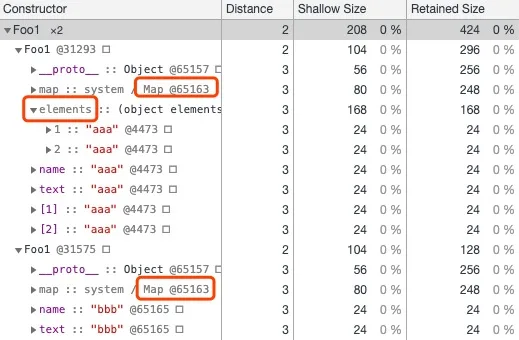
Both a and b have the named properties name and text, and a has two extra indexed properties on top of that. From the snapshot you can clearly see that the indexed properties are stored in Elements. In addition, a and b have the same structure (this structure will be introduced below).
You may be a little curious: the two objects have different properties, so how can they share the same structure? To understand this, you can start by asking yourself three questions.
- Why do we store objects at all? So that we can use them later, of course.
- What does using them take? Finding the property, that’s all.
- And what is describing the structure for? It gives you a map to follow and makes lookup easier.
Well, indexed properties are already arranged in order by themselves, so why would we go out of our way to look them up through their structure? If we don’t look them up through a structure, then we don’t need to describe that structure either, right? With that, it should not be hard to understand why a and b share the same structure: their structure only describes the situation where they both have name and text.
Of course, there are exceptions. Let’s add one more line to the code above.
a[1111] = 'aaa'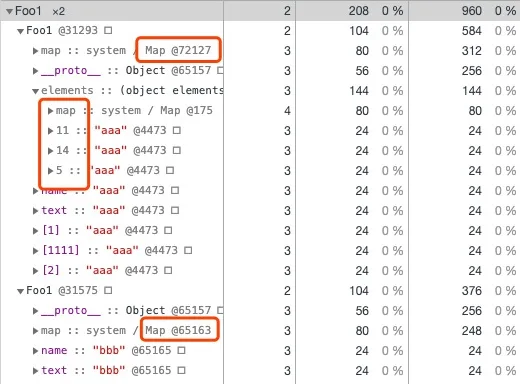
As you can see, the hidden class has changed, and the data stored in Element has lost its regularity. This is because once we add a[1111], the array becomes a sparse array. To save space, a sparse array switches to hash-based storage instead of using a complete array to describe that space. As a result, these indexed properties can no longer have their memory offsets computed directly from their index values. As for the change of the hidden class, it is probably meant to describe the changed structure of Element (you can compare this image with the screenshot of slow properties below: Foo1’s Property did not degrade into hash storage — only Element degrading into hash storage caused the hidden class to change).
Different Storage Modes for Named Properties
Named properties in V8 have three different storage modes: in-object properties, fast properties, and slow properties.
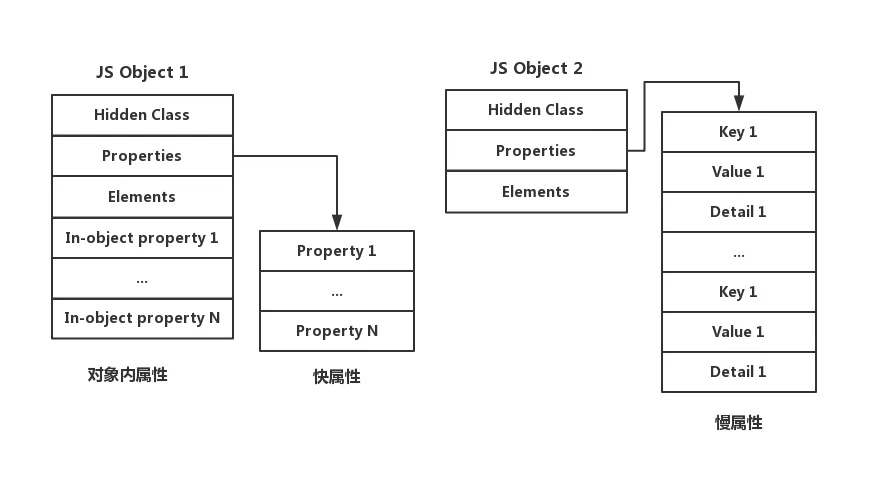
- In-object properties are stored on the object itself and offer the fastest access.
- Fast properties cost one extra addressing step compared with in-object properties.
- Slow properties, unlike the previous two, store the complete structure of every property (the structure of the other two is described in the hidden class, which will be explained below), and they are the slowest (in the rest of this article and in other related articles, slow properties, property dictionary, and hash storage all refer to the same thing).
Isn’t that a bit abstract? Don’t worry, let’s walk through an example.
// 实验2 三种不同类型的 Property 存储模式
function Foo2() {}

var a = new Foo2()
var b = new Foo2()
var c = new Foo2()

for (var i = 0; i < 10; i ++) {
  a[new Array(i+2).join('a')] = 'aaa'
}

for (var i = 0; i < 12; i ++) {
  b[new Array(i+2).join('b')] = 'bbb'
}

for (var i = 0; i < 30; i ++) {
  c[new Array(i+2).join('c')] = 'ccc'
}
a, b, and c have 10, 12, and 30 properties respectively. In the current Chrome 73, they end up stored in the three modes: in-object properties, in-object + fast properties, and slow properties. The runtime snapshots for this part are a bit long, so let’s look at them one by one.
In-Object Properties and Fast Properties
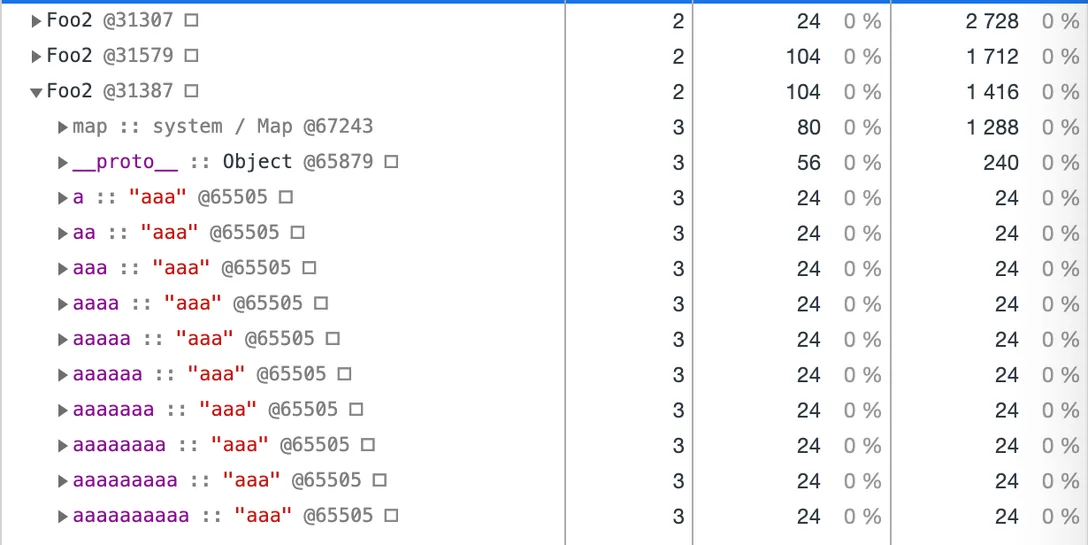
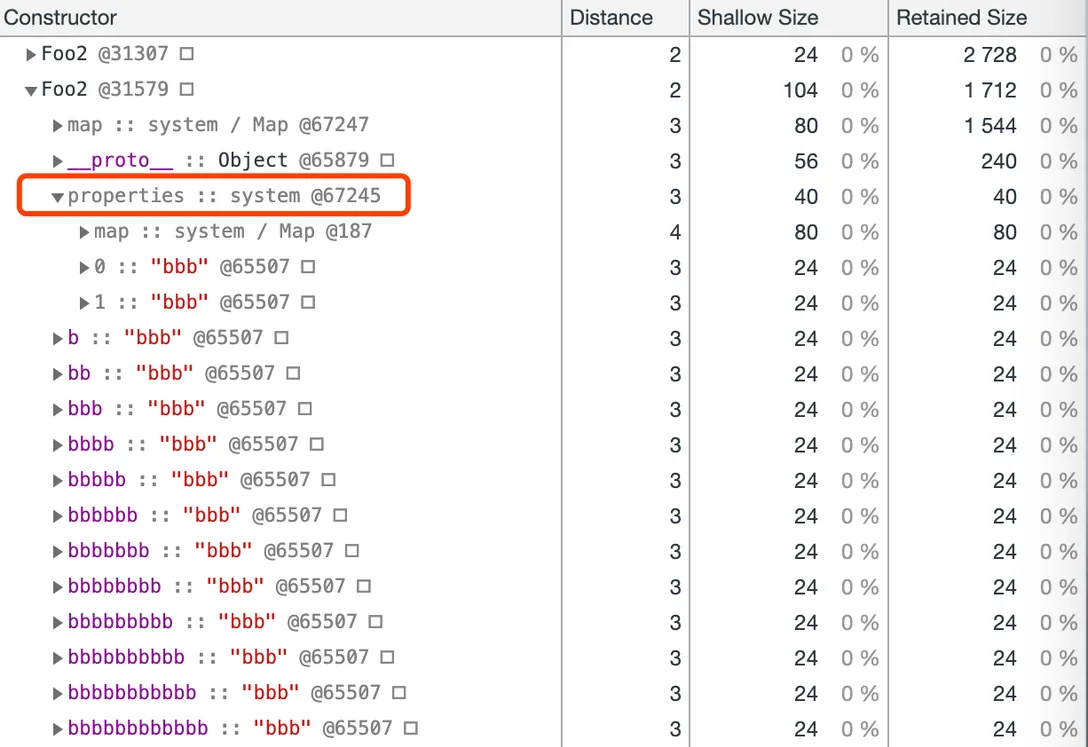
First, let’s look at a and b. To some extent, in-object properties and fast properties are actually the same thing. The difference is that in-object properties are allocated once and for all when the object is created, and the space is limited. Under my test conditions, the number of in-object properties was fixed at ten, and those ten slots were of equal size (you can think of them as ten pointers). Once the in-object slots are full, properties are stored as fast properties under properties, in creation order. Compared with in-object properties, fast properties require one extra addressing step through properties; after that, lookup is linear, just like in-object properties.
Slow Properties
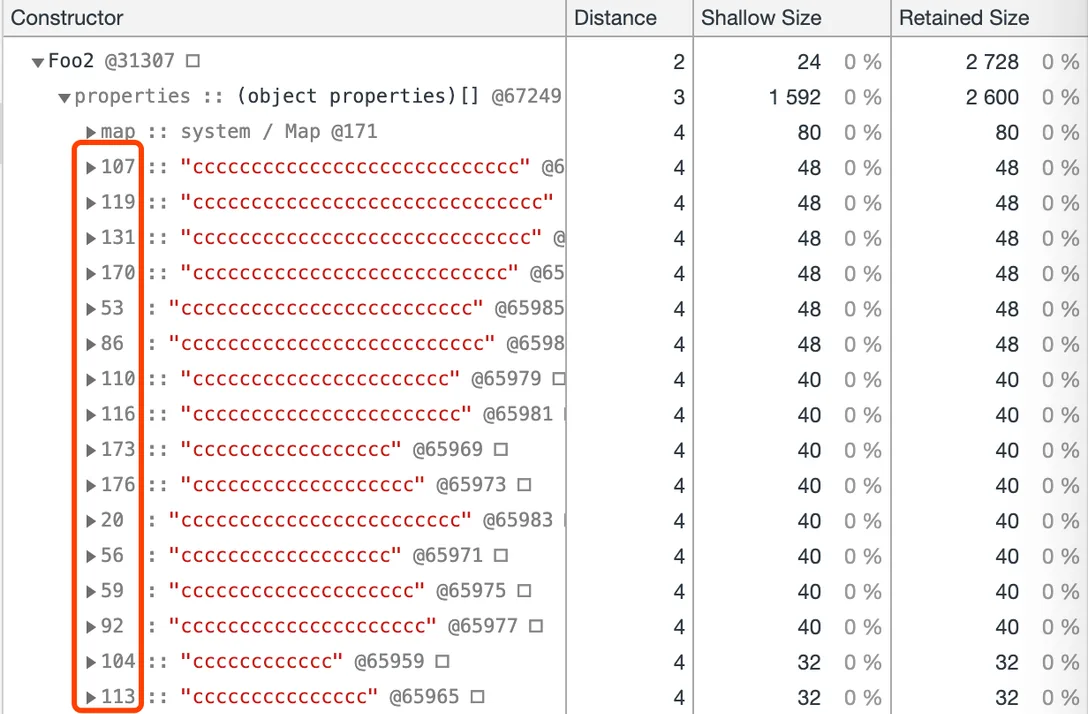
Next, let’s look at c. This one is way too long, so only part of it is captured. You can see that compared with b (fast properties), the indices inside properties have become irregular numbers, which means this object has already turned into a hash-based storage structure.
So, here comes the question: why split storage into these modes? Let me offer my understanding.
Why Split Into Three Storage Modes? (My Own Understanding)
This was actually a question raised by a colleague during an internal sharing session at my company. I believe you will have a similar doubt when you read this far. At the time I could not explain why very well either, until I saw a diagram of hash storage (the image comes from the web).
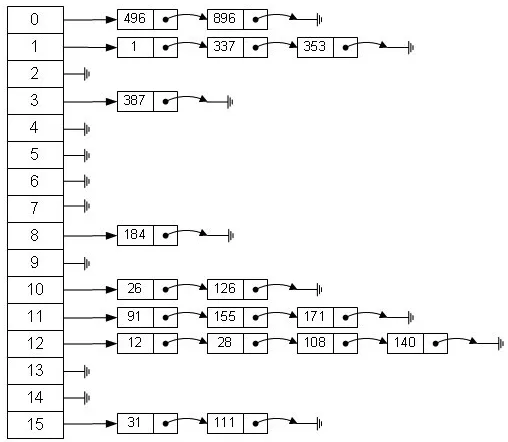
In V8, the most fundamental reason behind every seemingly baffling optimization is to be faster. — me
You can look at it this way: early JS engines all used slow-property storage, and the first two modes came about as optimizations over that storage.
We know that all data ends up represented as binary at the lowest level. We also know that if program logic involves only bitwise operations on binary (AND, OR, NOT), it runs fastest. Below, putting aside costs such as addressing, let’s compare these three modes (of two kinds) purely by the number of operations.
What in-object properties and fast properties do is simple: linearly check each slot to see whether it is the target one. The cost of this part can be understood as at most N simple bit operations (where N is the total number of properties). Slow properties, on the other hand, must first go through a hash computation. That is a complex operation, several times slower than a simple bit operation. Besides, a hash table is a two-dimensional space, so after the hash computes a coordinate in one dimension, you still need a linear search along the other dimension. So it should be easy to see why slow properties are not used when there are very few properties.
Here is a snippet of V8’s string hash algorithm, in which the left shifts and right shifts alone add up to 60 (60 simple bit operations).
// V8 中字符串的哈希值生成器
uint32_t StringHasher::GetHashCore(uint32_t running_hash) {
  running_hash += (running_hash << 3);
  running_hash ^= (running_hash >> 11);
  running_hash += (running_hash << 15);
  int32_t hash = static_cast<int32_t>(running_hash & String::kHashBitMask);
  int32_t mask = (hash - 1) >> 31;
  return running_hash | (kZeroHash & mask);
}
Then why not always use in-object properties or fast properties?
Because once there are many properties, these two modes may no longer beat slow properties. Suppose a hash computation costs 60 simple bit operations and the hash algorithm performs well. With only in-object or fast properties, accessing the 120th property takes 120 simple bit operations. With slow properties, we need one hash computation (60 simple bit operations) plus a linear comparison in the second dimension (far fewer than 60 — we assumed a well-behaved hash algorithm, so the properties are evenly distributed in the hash table).
A one-sided friendly recommendation: Programmer Xiaohui’s Comic: What Is a HashMap?
Hidden Classes
The thing mentioned above that describes how named properties are stored — the “map” in “following the map” — is called a Map in V8, better known by the name hidden class.
In SpiderMonkey (the Firefox engine), a similar design is called a Shape.
Why Introduce Hidden Classes?
First of all, of course, speed.
JavaScript is a dynamic language; it allows developers to define objects in very flexible ways. Objects can change type at runtime, and properties can be added or removed. By contrast, in a static language like Java, a type cannot be changed once created, and properties can be accessed through fixed offsets.
As mentioned earlier, storing and retrieving properties through a hash table requires an extra hash computation. To improve the speed of accessing object properties and make storing and retrieving them fast, V8 introduced hidden classes.
The other significance of introducing hidden classes is that they save a great deal of memory.
In ECMAScript, the attributes of object properties are described as the following structure.
[[Value]]: the value of the property[[Writable]]: whether the property is writable (i.e., whether it can be reassigned)[[Enumerable]]: whether the property is enumerable[[Configurable]]: whether the property is configurable (deletable)
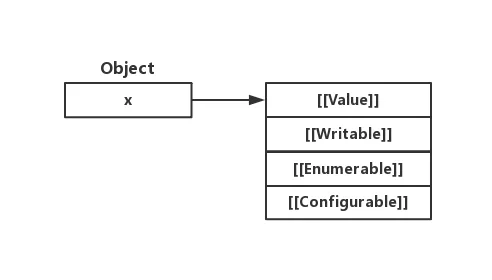
Introducing hidden classes separates a property’s Value from its other Attributes. Generally speaking, an object’s values change all the time, while the Attributes hardly ever change. So why would we keep describing the nearly unchanging Attributes over and over? That is obviously a waste of memory.
Creation of Hidden Classes
During object creation, every time a named property is added, a new hidden class is generated accordingly. Under the hood, V8 implements a transition tree that links hidden classes together; if the same properties are added in the same order, the transition tree guarantees that you end up with the same hidden class.
In the example below, a corresponds to a different hidden class when it is an empty object, after the name property is added, and after the text property is added.
// 实验3 隐藏类的创建
let a = {}
a.name = 'thorn1'
a.text = 'thorn2'
Below is a diagram of the creation process (it only depicts the process; the details may differ slightly from the actual implementation).
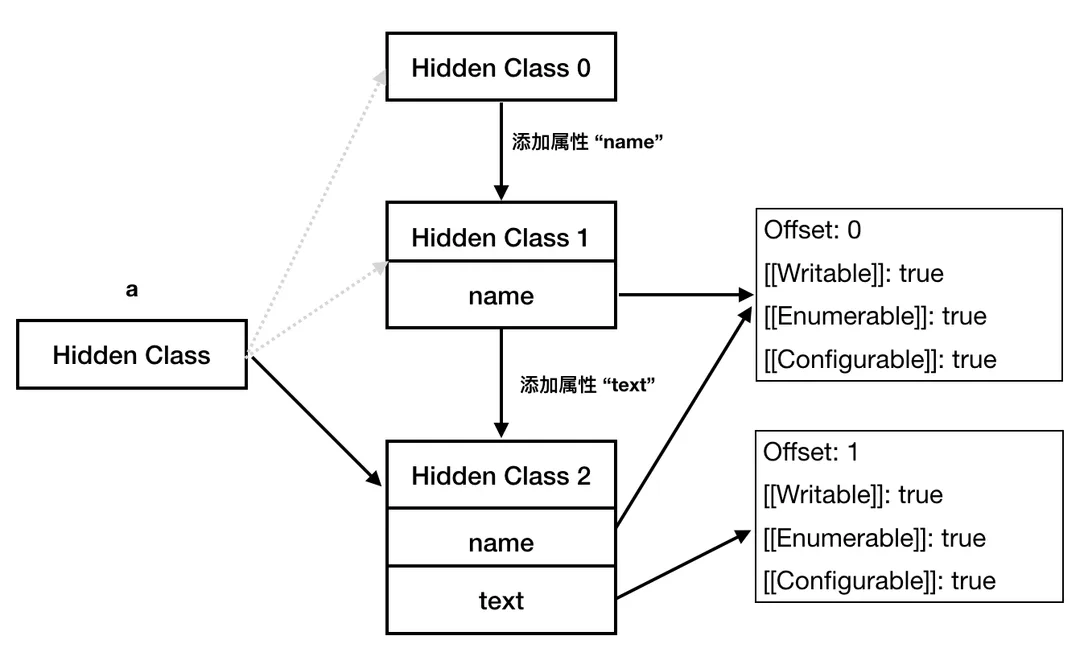
From the memory snapshot we can also see that Hidden Class 1 and Hidden Class 2 are different, and that the latter’s back_pointer points to the former — which confirms the flow analysis in the diagram above.
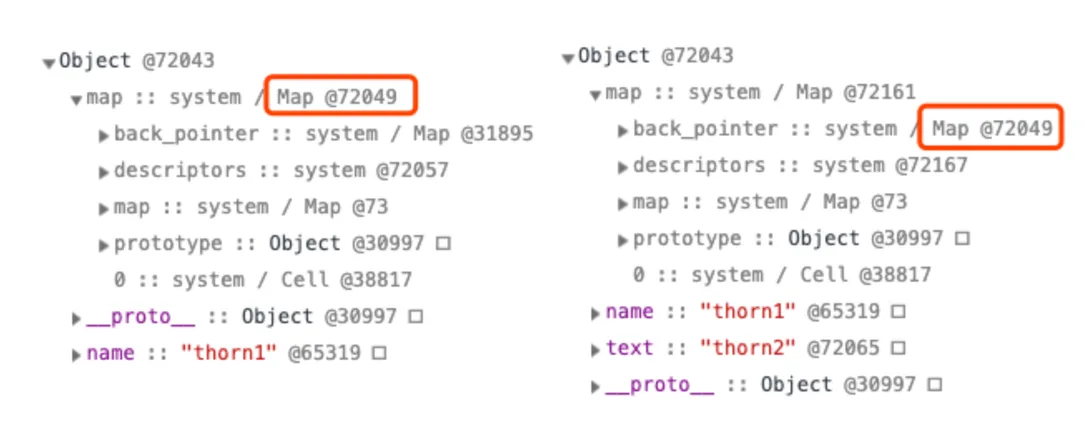
Some articles mention that in actual storage, each time a property is added, the newly created hidden class only describes this newly added property rather than all properties — that is, Hidden Class 2 would in fact only describe
text, notname. I have not verified this via memory snapshots yet (shedding tears over my lack of skill), but logically speaking it should be the case.
There is one more little tidbit here.
// 实验4 隐藏类创建时的优化
let a = {};
a.name = 'thorn1'
let b = { name: 'thorn2' }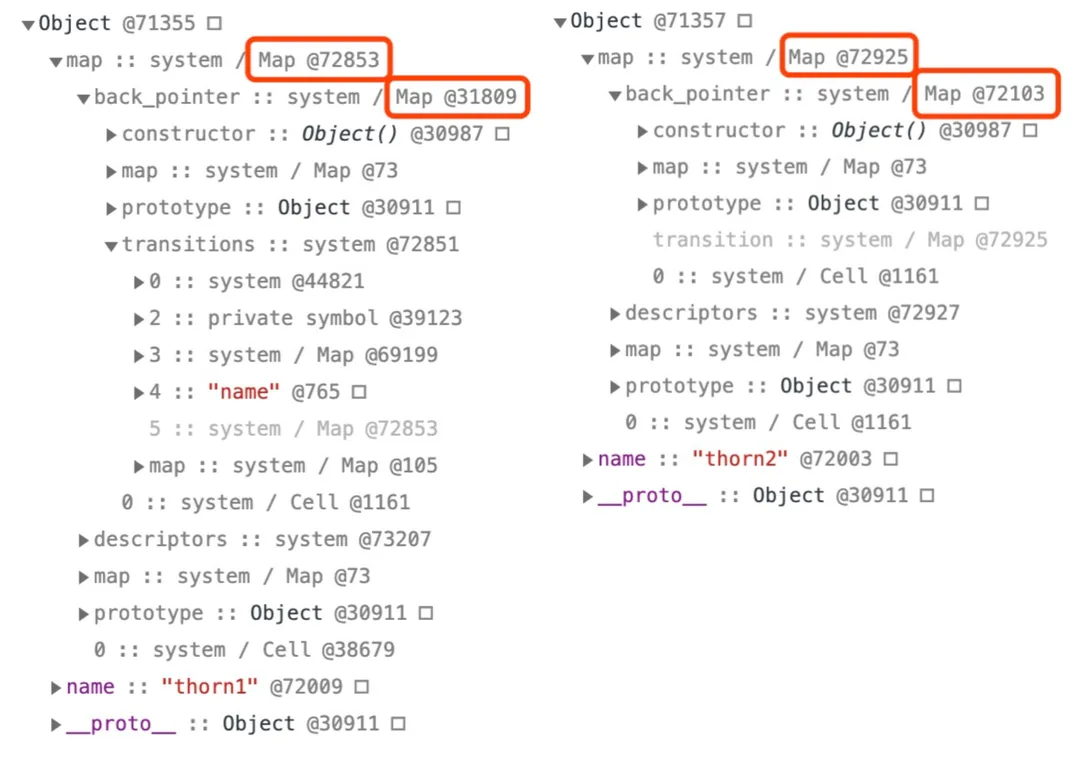
The difference between a and b is that a first creates an empty object and then adds the named property name to it, while b directly creates an object containing the named property name. From the memory snapshot we can see that a and b have different hidden classes, and their back_pointers differ too. This is mainly because, when b’s hidden class is created, the step of creating a separate hidden class for the empty object is skipped. So, a more precise description of how to end up with the same hidden class is — from the same starting point, add structurally identical properties (properties whose Attributes match except for Value) in the same order.
If you are extra, extra interested in how hidden classes are created, a one-sided friendly recommendation is the translation JavaScript Engine Fundamentals: Shapes and Inline Caches by @hijiangtao on Zhihu.
The Magical delete Operation
Above we discussed the effect of adding properties on hidden classes; now let’s take a look at the effect of the delete operation on hidden classes.
// 实验5 delete 操作的影响
function Foo5 () {}
var a = new Foo5()
var b = new Foo5()

for (var i = 1; i < 8; i ++) {
  a[new Array(i+1).join('a')] = 'aaa'
  b[new Array(i+1).join('b')] = 'bbb'
}

delete a.a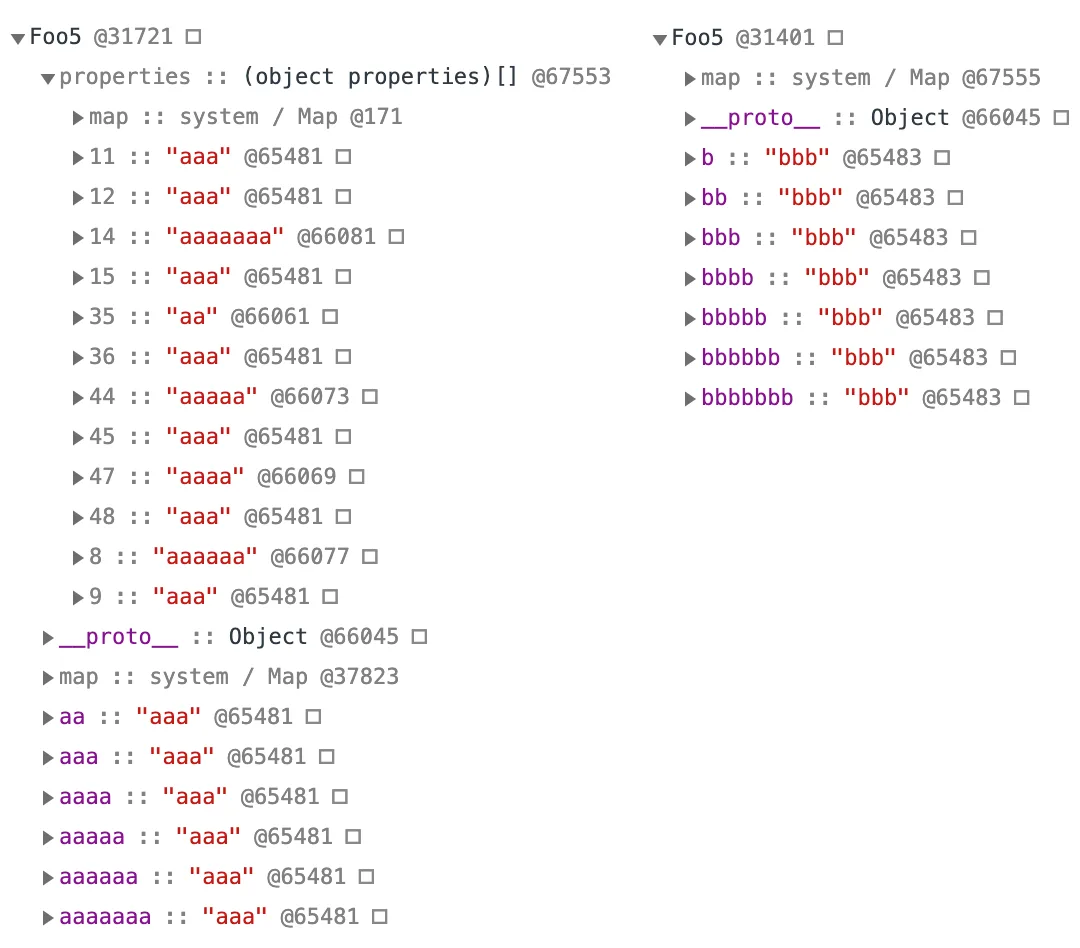
As in our earlier experiments, a and b both use in-object properties. From the snapshot you can see that after a.a is deleted, a becomes slow properties and falls back to hash storage.
But if we delete the properties in the reverse order of how they were added, things turn out differently.
// 实验6 按添加顺序删除属性
function Foo6 () {}
var a = new Foo6()
var b = new Foo6()

a.name = 'aaa'
a.color= 'aaa'
a.text = 'aaa'

b.name = 'bbb'
b.color = 'bbb'

delete a.text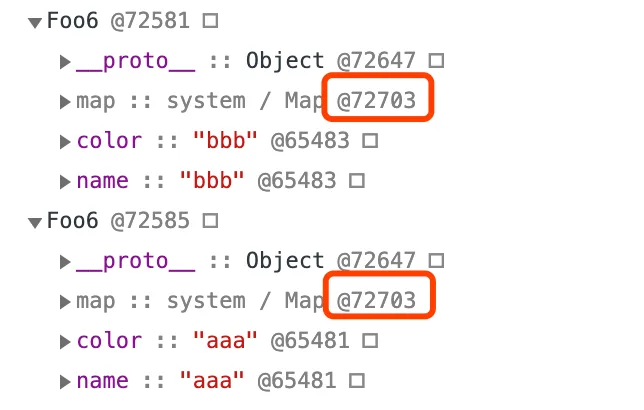
We gave a and b the same properties name and color in the same way, then gave a one extra property text, and then deleted that property. You can see that now a and b share the same hidden class, and a has not fallen back to hash storage either.
Conclusions and Takeaways
- Properties divide into named properties and indexed properties: named properties are stored in
Properties, and indexed properties are stored inElements. - Named properties have three different storage modes: in-object properties, fast properties, and slow properties. The first two are accessed through linear search, while slow properties are accessed through hash storage.
- Always initializing object members in the same order makes full use of the same hidden classes and therefore improves performance.
- Adding or removing indexed properties does not change the hidden class; sparse indexed properties degrade into hash storage.
- The delete operation may change the object’s structure, causing the engine to downgrade the object’s storage to a hash table, which is bad for V8’s optimization, so it should be avoided whenever possible (when properties are deleted in the reverse direction of how they were added, the object does not degrade into hash storage).
Comments
Sign in with GitHub to leave a comment. View discussions on GitHub ↗