How V8 Works — V8's JavaScript Execution Pipeline
A Word from the Author
The “How V8 Works” series is a summary of what I learned while studying V8. Since officially becoming a front-end engineer a year ago, I have been consciously learning about V8. I also found that fresh, highly original Chinese-language material is scarce in the tech community, so I started sharing the summaries from my learning process.
Due to a busy schedule, I had not updated my blog for six months. The prelude to this series was an article I wrote in April, How V8 Works — Object Representation in V8, in which we introduced V8’s object representation and verified it using Chrome DevTools.
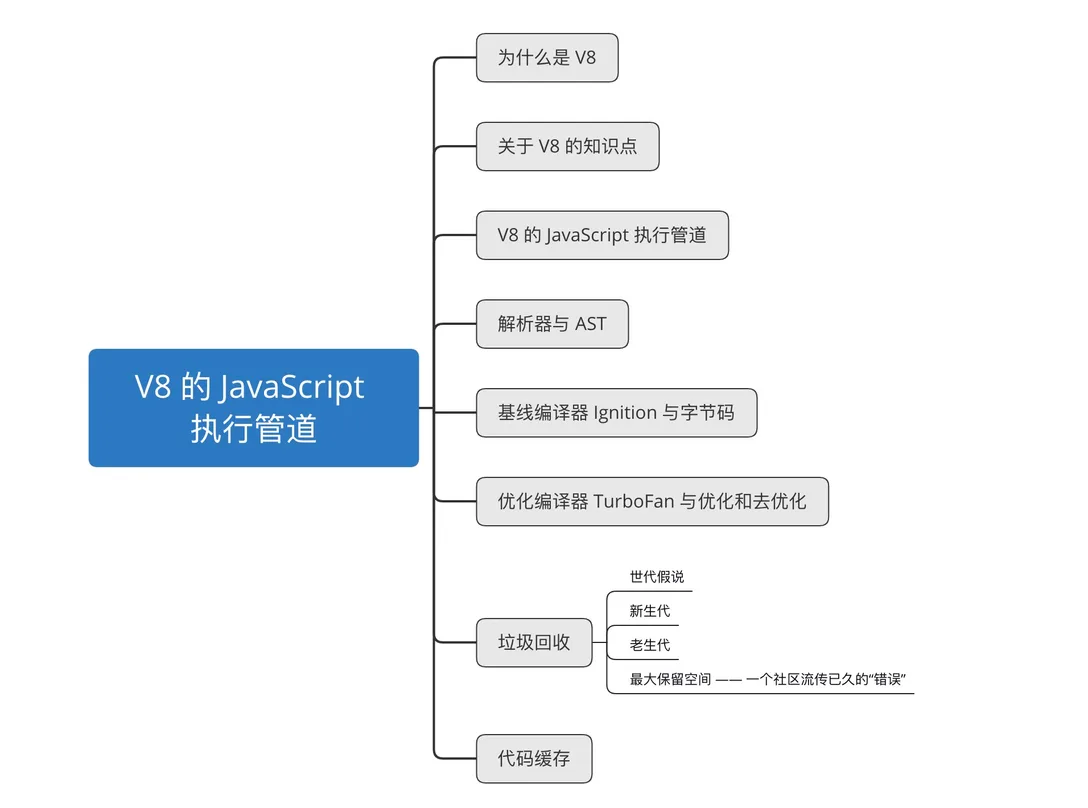
This article is the first article of this series in the true sense of the word. It is positioned as an outline of the series: following the flow of JavaScript execution in V8, it introduces what happens at each step in order, and clears up a “error” that has spread widely in the community. This article will not dig too deeply into the details (later installments will expand on them). Feel free to leave in the comments which parts of the V8 engine you would like to learn about — maybe the next topic will be picked from them and covered first.
Happy reading.
1. Why V8
Any application that can be written in JavaScript, will eventually be written in JavaScript.
I believe many friends have heard of a famous law in the front-end world called Atwood’s Law. In 2007, Jeff Atwood proposed that “all applications that can be written in JavaScript will eventually be written in JavaScript”. Fast-forward 12 years, and we can indeed see that JavaScript now plays a role in the browser, on the server, on the desktop, on mobile, and in IoT.
On the other hand, as of this writing (2019-11-08), Chrome’s market share across all platforms has reached 64.92% (source: StatCounter). As Chrome’s JavaScript engine, V8 has also played a crucial role in Chrome’s expansion of market share.
As one of the most powerful JavaScript engines, V8 is likewise everywhere. In the browser, it powers Chrome and the many Chromium-based browsers. On the server, it is the runtime for Node.js and the Deno framework. On the desktop and in IoT, V8 also has its place.
2. A Few Facts About V8
V8 is a high-performance JavaScript and WebAssembly engine written in C++, supporting eight processor architectures, including the ia32, x64, and arm that we are all familiar with.
V8’s Release Cycle
- A new V8 version is released roughly every six weeks
- V8 versions correspond to Chrome versions; for example, V8 v7.8 corresponds to Chrome 78
V8’s Competitors
- Chakra (the former Edge JavaScript engine)
- JavaScript Core (Safari)
- SpiderMonkey (Firefox)
V8’s Key Components
- Ignition (baseline compiler)
- TurboFan (optimizing compiler)
- Orinoco (garbage collector)
- Liftoff (WebAssembly baseline compiler)
Liftoff is the baseline compiler for WebAssembly that was enabled starting with V8 6.8. Although version 6.8 was released in August 2018, many V8 articles published in the community after that date still do not mention Liftoff. Whether an article covers Liftoff can also serve as an indicator of whether the article’s content is outdated.
Since WebAssembly is outside the scope of this article, the introduction to Liftoff will be omitted below.
3. V8’s JavaScript Execution Pipeline
The early V8 execution pipeline consisted of the baseline compiler Full-Codegen and the optimizing compiler CrankShaft. (The V8 execution pipeline has gone through many adjustments; this article only picks one of the more significant stages of the early pipeline. If you are interested in the evolution of the execution pipeline, you can learn about it through a related V8 talk.)
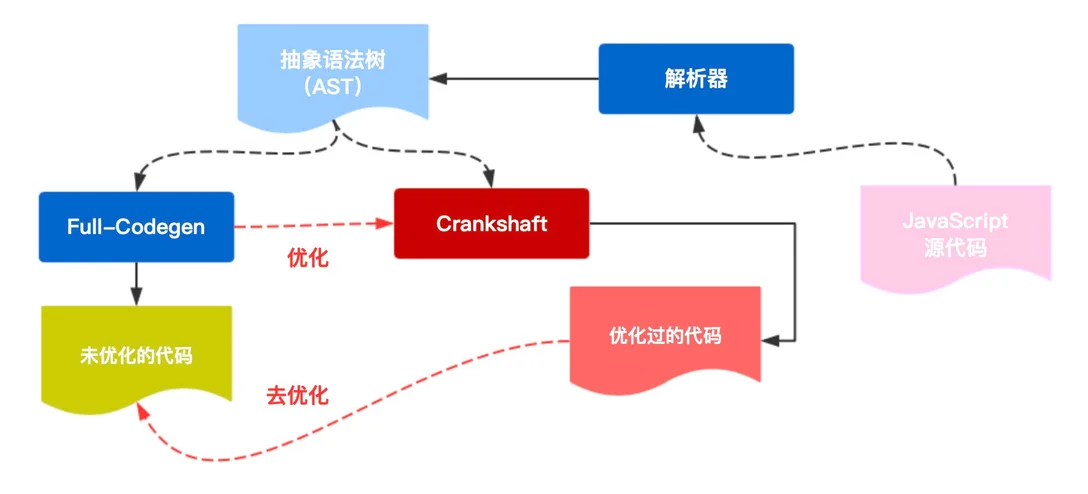
Of the two, the baseline compiler cares more about compilation speed, while the optimizing compiler cares more about the execution speed of the compiled code. Using the baseline compiler and the optimizing compiler together gives JavaScript code a faster cold start, and faster execution once optimized.
This architecture had many problems. For example, Crankshaft could only optimize a subset of JavaScript; the compilation pipeline lacked isolation between layers, and in some cases assembly code even had to be written for multiple processor architectures at the same time, and so on.
To solve the problems of architectural confusion and difficult scaling, after years of evolution, V8 now has a JavaScript execution pipeline consisting of the parser, the baseline compiler Ignition, and the optimizing compiler TurboFan.
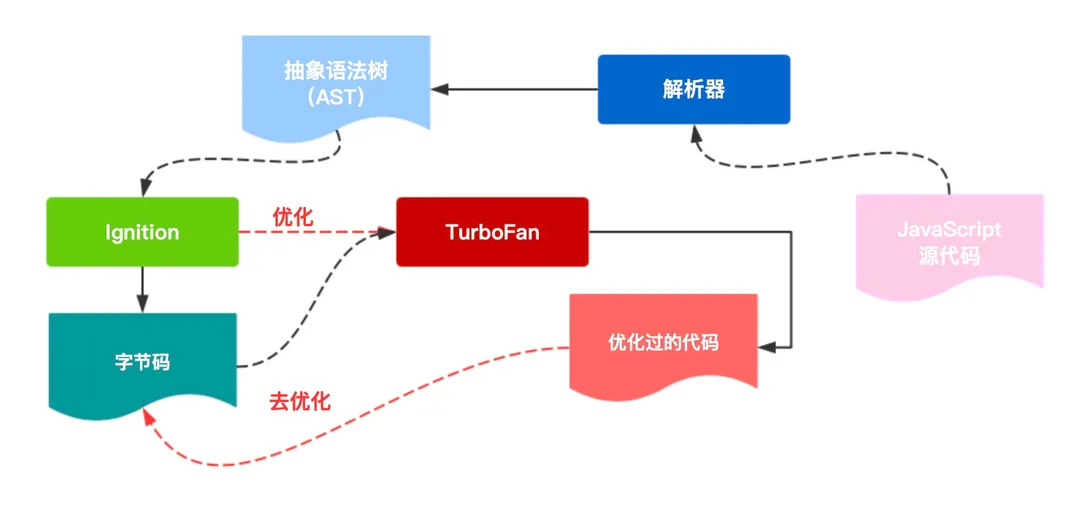
The parser converts JavaScript source code into an AST, the baseline compiler compiles the AST into bytecode, and when the code meets certain conditions, it is recompiled by the optimizing compiler to produce optimized bytecode.
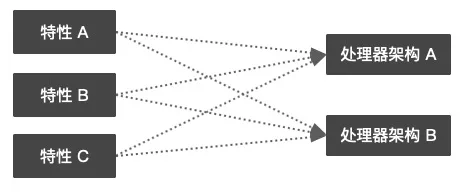
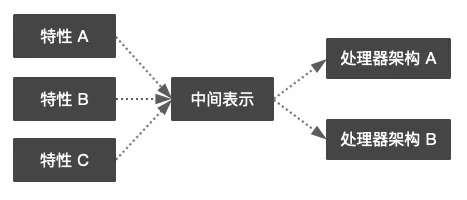
Here we have to mention the idea of layering. In the process of improving the execution pipeline, introducing IR (intermediate representation) effectively improved the system’s extensibility, and reduced the coupling between related modules as well as the system’s complexity.
For example, suppose there are three features A, B, and C that need to be ported to two processor platforms. Before introducing IR, 3 * 2 = 6 code implementations were needed; after introducing IR, only 3 + 2 = 5. One is a multiplicative relationship, the other an additive one. When many features need to be implemented and adapted to many processor architectures, the advantage of introducing IR increases greatly.
Next, let’s walk through a piece of code and analyze how JavaScript is processed in V8.
// example1.js
function addTwo(a, b) {
  return a + b
}
4. The Parser and the AST
Parsing code takes time, so JavaScript engines avoid fully parsing source code files as much as possible. On the other hand, in a single user visit, a lot of the code on the page will never be executed — for example, actions triggered by user interaction.
Precisely for this reason, all mainstream browsers have implemented lazy parsing. Instead of having to generate an AST (abstract syntax tree) for every function, the parser can decide to “pre-parse” or “fully parse” the functions it encounters.
Pre-parsing checks the syntax of the source code and throws syntax errors, but it does not resolve the scopes of the variables in the function or generate an AST. Full parsing analyzes the function body and generates the AST data structure corresponding to the source code. Compared with normal parsing, pre-parsing is 2 times faster.
Generating an AST mainly goes through two stages: tokenization and semantic analysis. The AST is meant to describe the concrete syntactic composition of the source code through a structured tree data structure, and is commonly used for syntax checking (static code analysis), code obfuscation, code optimization, and so on.
We can use the AST Explorer tool to generate the AST of JavaScript code.
// example1.js
function addTwo(a, b) {
  return a + b;
}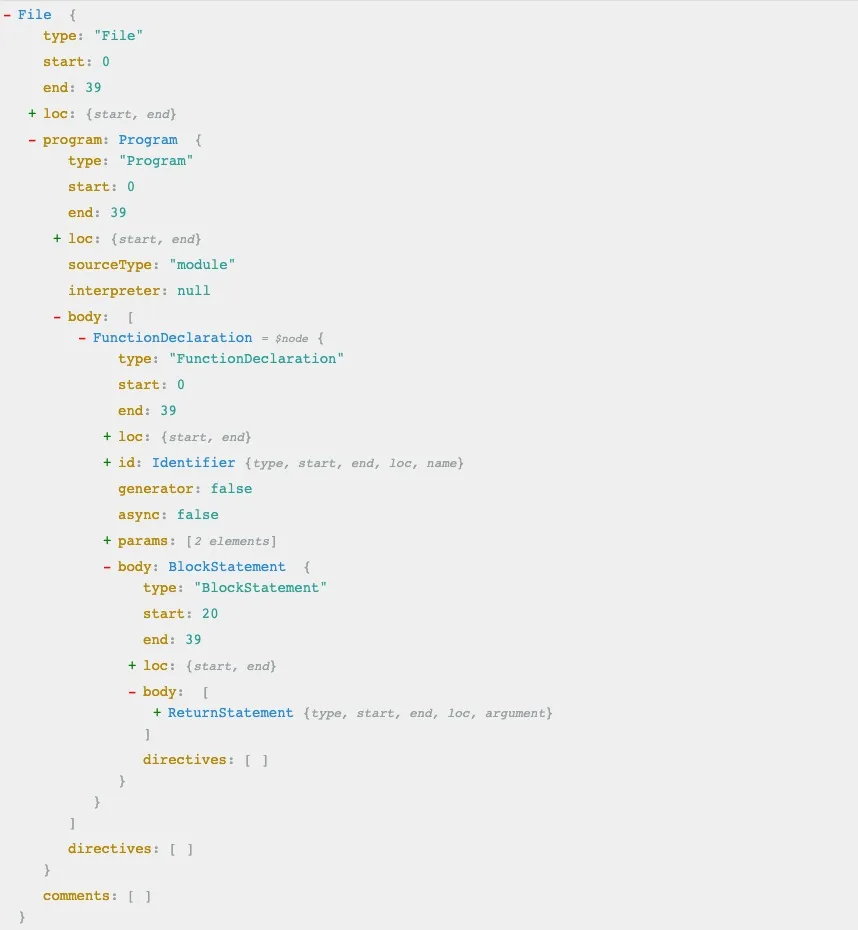
Note that the figure above only describes the rough structure of the AST. V8 has its own AST representation, and the AST it generates differs somewhat.
5. The Baseline Compiler Ignition and Bytecode
V8 introduced JIT (just-in-time) compilation technology, quickly generating bytecode for execution through the Ignition baseline compiler.
Bytecode is an abstraction of machine code. If the design of the bytecode is the same as the computational model of a physical CPU, compiling the bytecode into machine code becomes easier. This is why interpreters are usually register or stack machines. Ignition is a register machine with an accumulator. (Understanding V8’s Bytecode)
Compared with the previous baseline compiler Full-Codegen, Ignition generates much smaller bytecode (Full-Codegen generated machine code). The bytecode can be used directly by the optimizing compiler TurboFan to generate graphs (TurboFan’s optimization of code is based on graphs), avoiding the need for the optimizing compiler to re-parse the JavaScript source code when optimizing it.
You can view the bytecode generated by Ignition using the d8 tool (V8’s developer shell, which you can get by building the V8 source code; for the build process see Building V8 with GN).
d8 --print-bytecode example1.js[generated bytecode for function: (0x2d5c6af1efe9 <SharedFunctionInfo>)]
Parameter count 1
Register count 3
Frame size 24
0x2d5c6af1f0fe @ 0 : 12 00 LdaConstant [0]
0x2d5c6af1f100 @ 2 : 26 fb Star r0
0x2d5c6af1f102 @ 4 : 0b LdaZero
0x2d5c6af1f103 @ 5 : 26 fa Star r1
0x2d5c6af1f105 @ 7 : 27 fe f9 Mov <closure>, r2
0x2d5c6af1f108 @ 10 : 61 2c 01 fb 03 CallRuntime [DeclareGlobals], r0-r2
0x2d5c6af1f10d @ 15 : a7 StackCheck
0x2d5c6af1f10e @ 16 : 0d LdaUndefined
0x2d5c6af1f10f @ 17 : ab Return
Constant pool (size = 1)
0x2d5c6af1f0b1: [FixedArray] in OldSpace
- map: 0x2d5c38940729 <Map>
- length: 1
0: 0x2d5c6af1f021 <FixedArray[4]>
Handler Table (size = 0)All of Ignition’s bytecode operators can be found in the V8 source code; interested readers can explore them on their own.
6. The Optimizing Compiler TurboFan, and Optimization and Deoptimization
The fewer changes in function input types a compiler has to consider, the smaller and faster the generated code.
As is well known, JavaScript is a weakly typed language. There is a great deal of ambiguity and type checking in the ECMAScript standard, so the code generated by the baseline compiler executes inefficiently.
For example, a single operand of the + operator could be an integer, a float, a string, a boolean, or another reference type — not to mention the various combinations among them (get a feel for the ECMAScript standard’s definition of +).
function addTwo(a, b) {
  return a + b;
}
addTwo(2, 3); // 3
addTwo(8.6, 2.2); // 10.8
addTwo('hello ', 'world'); // "hello world"
addTwo('true or ', false); // "true or false"
// 还有很多组合...
But this does not mean JavaScript code cannot be optimized. For specific program logic, the arguments it receives are often of fixed types. Precisely for this reason, V8 introduced type feedback technology. When performing operations, V8 uses type feedback to dynamically check all arguments.
Simply put, for code that is executed repeatedly, if several executions all pass arguments of the same type, V8 will assume that the argument types of every subsequent execution will also be the same, and will optimize the code. The optimized code keeps basic type checks. If the argument types do not change in subsequent executions, V8 will keep executing the optimized code. And when, in some later execution, the types of the passed arguments change, V8 will “undo” the previous optimization — this step is called “deoptimization”.
Let’s slightly modify the code above and analyze its optimization process in V8.
// example2.js
function addTwo(a, b) {
  return a + b;
}

for (let j = 0; j < 100000; j++) {
  if (j < 80000) {
    addTwo(10, 10);
  } else {
    addTwo('hello', 'world');
  }
}
d8 --trace-opt --trace-deopt example2.js[marking 0x2ecfb2a5f229 <JSFunction (sfi = 0x2ecfb2a5f049)> for optimized recompilation, reason: hot and stable]
[compiling method 0x2ecfb2a5f229 <JSFunction (sfi = 0x2ecfb2a5f049)> using TurboFan OSR]
[optimizing 0x2ecfb2a5f229 <JSFunction (sfi = 0x2ecfb2a5f049)> - took 5.268, 5.305, 0.023 ms]
[deoptimizing (DEOPT soft): begin 0x2ecfb2a5f229 <JSFunction (sfi = 0x2ecfb2a5f049)> (opt #0) @2, FP to SP delta: 96, caller sp: 0x7ffee48218c8]
;;; deoptimize at <example2.js:10:5>, Insufficient type feedback for call
reading input frame => bytecode_offset=80, args=1, height=5, retval=0(#0); inputs:
0: 0x2ecfb2a5f229 ; [fp - 16] 0x2ecfb2a5f229 <JSFunction (sfi = 0x2ecfb2a5f049)>
1: 0x2ecfbcf815c1 ; [fp + 16] 0x2ecfbcf815c1 <JSGlobal Object>
2: 0x2ecfb2a418c9 ; [fp - 80] 0x2ecfb2a418c9 <NativeContext[253]>
3: 0x2ecf2a140d09 ; (literal 4) 0x2ecf2a140d09 <Odd Oddball: optimized_out>
4: 0x000000027100 ; rcx 80000
5: 0x2ecfb2a5f299 ; (literal 6) 0x2ecfb2a5f299 <JSFunction addTwo (sfi = 0x2ecfb2a5f0b1)>
6: 0x2ecfb2a5efd1 ; (literal 7) 0x2ecfb2a5efd1 <String[#5]: hello>
7: 0x2ecfb2a5efe9 ; (literal 8) 0x2ecfb2a5efe9 <String[#5]: world>
8: 0x2ecf2a140d09 ; (literal 4) 0x2ecf2a140d09 <Odd Oddball: optimized_out>
translating interpreted frame => bytecode_offset=80, variable_frame_size=48, frame_size=104
0x7ffee48218c0: [top + 96] <- 0x2ecfbcf815c1 <JSGlobal Object> ; stack parameter (input #1)
-------------------------
0x7ffee48218b8: [top + 88] <- 0x00010bd36b5a ; caller's pc
0x7ffee48218b0: [top + 80] <- 0x7ffee48218d8 ; caller's fp
0x7ffee48218a8: [top + 72] <- 0x2ecfb2a418c9 <NativeContext[253]> ; context (input #2)
0x7ffee48218a0: [top + 64] <- 0x2ecfb2a5f229 <JSFunction (sfi = 0x2ecfb2a5f049)> ; function (input #0)
0x7ffee4821898: [top + 56] <- 0x2ecfb2a5f141 <BytecodeArray[99]> ; bytecode array
0x7ffee4821890: [top + 48] <- 0x00000000010a <Smi 133> ; bytecode offset
-------------------------
0x7ffee4821888: [top + 40] <- 0x2ecf2a140d09 <Odd Oddball: optimized_out> ; stack parameter (input #3)
0x7ffee4821880: [top + 32] <- 0x000000027100 <Smi 80000> ; stack parameter (input #4)
0x7ffee4821878: [top + 24] <- 0x2ecfb2a5f299 <JSFunction addTwo (sfi = 0x2ecfb2a5f0b1)> ; stack parameter (input #5)
0x7ffee4821870: [top + 16] <- 0x2ecfb2a5efd1 <String[#5]: hello> ; stack parameter (input #6)
0x7ffee4821868: [top + 8] <- 0x2ecfb2a5efe9 <String[#5]: world> ; stack parameter (input #7)
0x7ffee4821860: [top + 0] <- 0x2ecf2a140d09 <Odd Oddball: optimized_out> ; accumulator (input #8)
[deoptimizing (soft): end 0x2ecfb2a5f229 <JSFunction (sfi = 0x2ecfb2a5f049)> @2 => node=80, pc=0x00010bd394e0, caller sp=0x7ffee48218c8, took 0.331 ms]
[marking 0x2ecfb2a5f229 <JSFunction (sfi = 0x2ecfb2a5f049)> for optimized recompilation, reason: hot and stable]
[marking 0x2ecfb2a5f299 <JSFunction addTwo (sfi = 0x2ecfb2a5f0b1)> for optimized recompilation, reason: small function]
[compiling method 0x2ecfb2a5f299 <JSFunction addTwo (sfi = 0x2ecfb2a5f0b1)> using TurboFan]
[compiling method 0x2ecfb2a5f229 <JSFunction (sfi = 0x2ecfb2a5f049)> using TurboFan OSR]
[optimizing 0x2ecfb2a5f229 <JSFunction (sfi = 0x2ecfb2a5f049)> - took 0.161, 0.441, 0.018 ms]
[optimizing 0x2ecfb2a5f299 <JSFunction addTwo (sfi = 0x2ecfb2a5f0b1)> - took 0.096, 0.231, 0.007 ms]
[completed optimizing 0x2ecfb2a5f299 <JSFunction addTwo (sfi = 0x2ecfb2a5f0b1)>]In this code, we executed the + operation 100,000 times: the first 80,000 times added two integers, and the last 20,000 times added two strings.
By tracing V8’s optimization log, we can see that at line 10 of the code (that is, on the 80,001st execution), the argument types changed from integers to strings, which triggered a deoptimization.
Note that deoptimization is expensive; when writing functions in practice, you should try to avoid triggering deoptimization.
7. Garbage Collection
When memory is no longer needed, it is reclaimed by the garbage collector, which runs periodically.
Every garbage collector has some basic tasks that must be completed regularly.
- Identify live/dead objects
- Reclaim/reuse the memory occupied by dead objects
- Compact/defragment memory (optional)
V8’s garbage collection mainly has three phases: marking, sweeping, and compacting.
The Generational Hypothesis
The generational hypothesis, also known as the weak generational hypothesis, states that most newly born objects die as soon as they are allocated (“burn after use”), while old objects usually tend to live forever.
V8’s garbage collection is based on the generational hypothesis and divides memory into the young generation and the old generation.
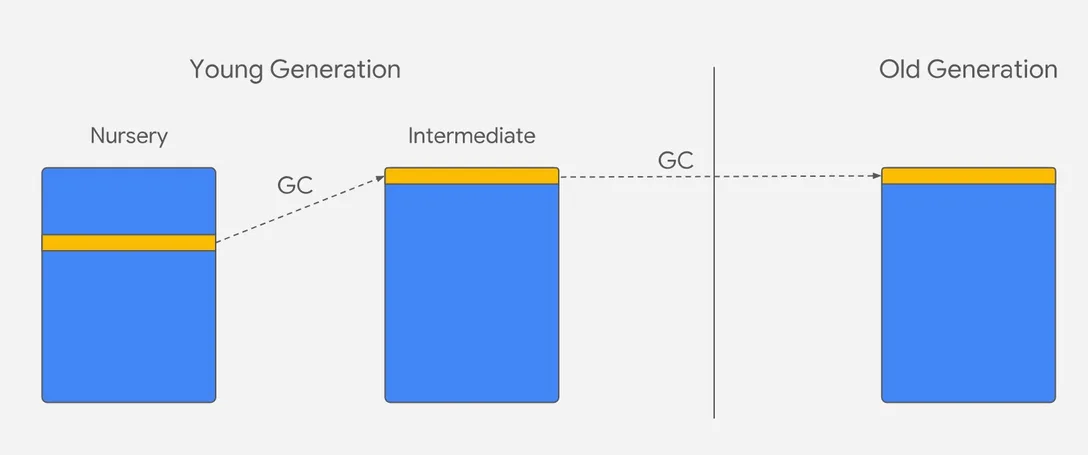 Image source: V8 blog
As shown in the figure, the young generation is further subdivided into the Nursery and Intermediate sub-generations (the division is only logical). New objects are allocated in the Nursery sub-generation of the young generation. If an object survives the first garbage collection, its flag is changed and it enters the logical Intermediate sub-generation, while in physical storage it still remains in the young generation. If the object survives the next garbage collection again, it enters the old generation. The process of an object moving from the young generation into the old generation is called promotion.
V8 adopts different garbage collection strategies for the young and old generations, making garbage collection more targeted and more efficient. At the same time, V8 also limits the memory size of the young and old generations.
| Name | Algorithm | Size |
|---|---|---|
| Young generation | Parallel Scavenge algorithm | 32MB (64-bit) / 16MB (32-bit) |
| Old generation | Mark-sweep, mark-compact algorithms | 1400MB (64-bit) / 700MB (32-bit) |
Note that as memory grows larger, the number of garbage collections decreases, but each one also takes longer, which will negatively affect the application’s performance and responsiveness. Therefore, bigger memory is not necessarily better.
The Young Generation
V8 uses the Parallel Scavenge algorithm, which is similar to the Halstead algorithm (before V8 v6.2, a Cheney-like algorithm was used); its core is a copying algorithm.
The copying algorithm is a way of trading space for time.
V8 splits the young generation into two semi-spaces of the same size, called the Form space and the To space. During garbage collection, V8 checks the live objects in the From space and copies those objects to the To space. Afterwards, V8 directly frees the space corresponding to the dead objects. After each copy is completed, the positions of From and To are swapped.
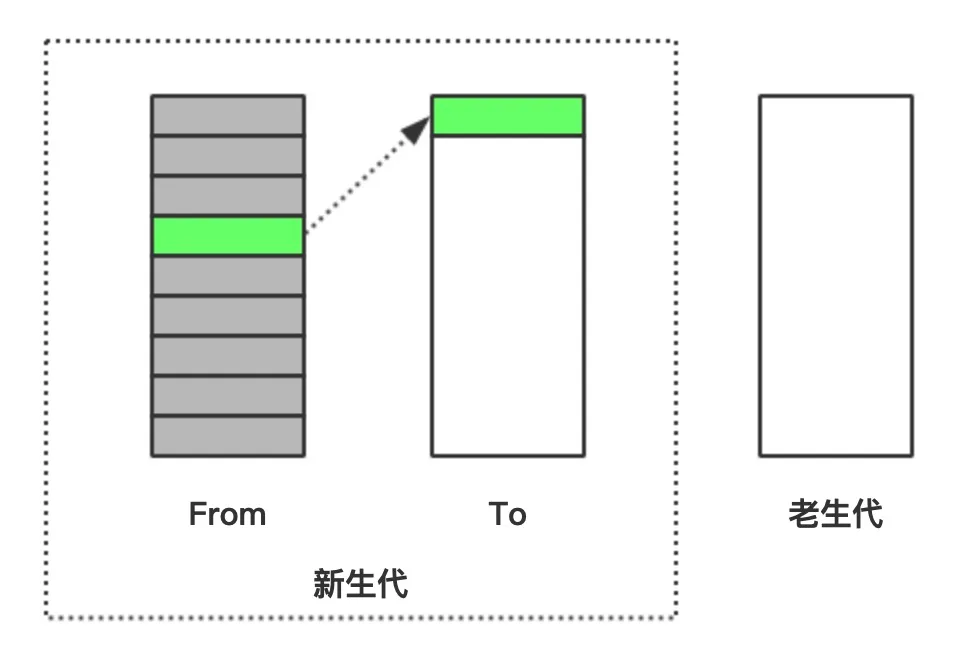
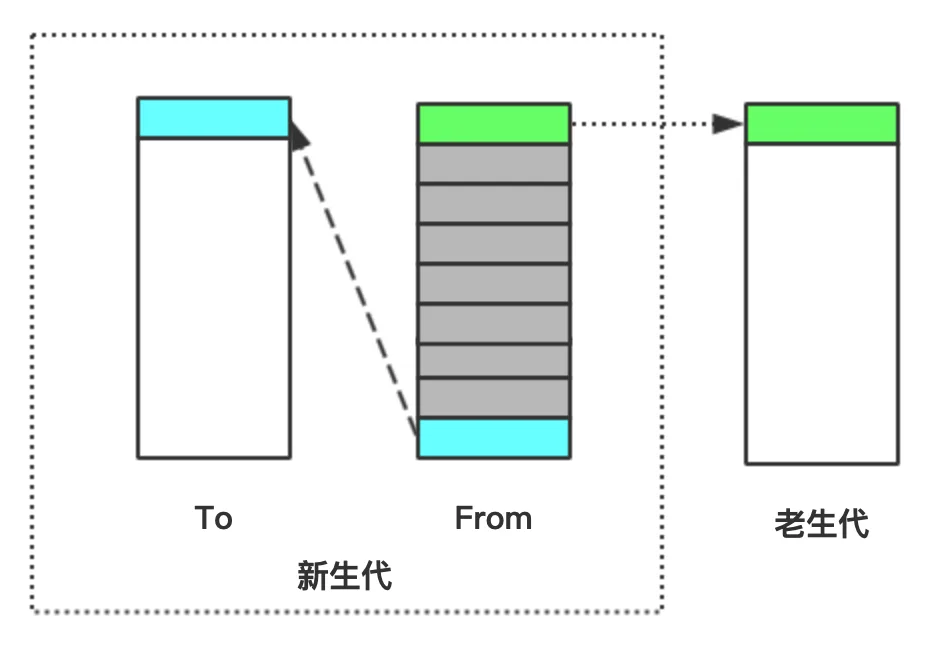
When an object is still alive after one copying, it is moved to the old generation; this process is called promotion.
The Old Generation
According to the generational hypothesis, objects in the old generation tend to live forever — that is, they rarely need to be collected — which means using a copying algorithm in the old generation is not feasible. V8 uses the mark-sweep and mark-compact algorithms for garbage collection in the old generation.
Mark-Sweep
Mark-sweep was born more than half a century ago. Its algorithmic principle is very simple. The garbage collector starts from the root nodes, marks the objects directly referenced by the roots, and then recursively marks the objects directly referenced by those objects. The reachability of an object serves as the basis for whether it is “alive”.
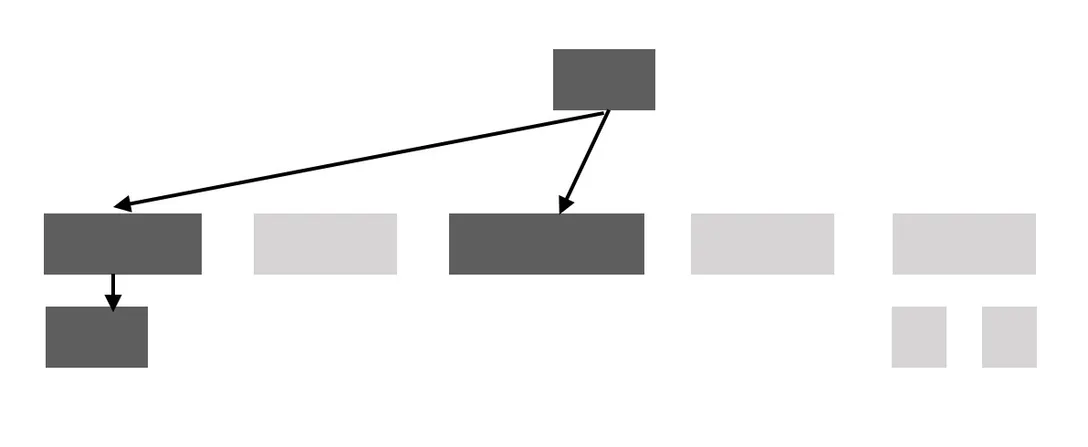
The time spent by the mark-sweep algorithm is proportional to the number of live objects.
Mark-Compact
The mark-compact algorithm is the product of combining the copying algorithm and the mark-sweep algorithm.
After we perform mark-sweep, memory fragmentation may appear, and these fragments are harmful when our program allocates memory.
To give an extreme example, in the figure below, the blue object is a new object for which we need to allocate memory. Before memory compaction, none of the fragmented spaces can hold a complete object; after memory compaction, the fragmented spaces are merged into one large space that can hold the new object.
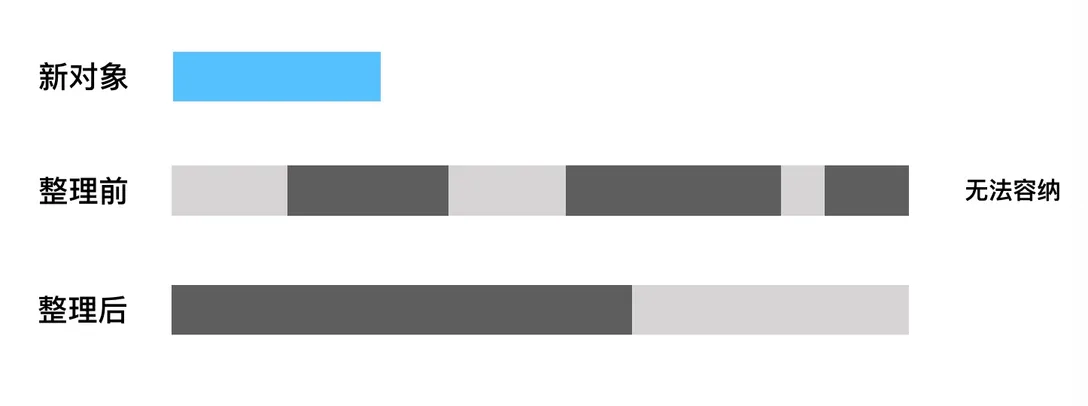
The advantages and disadvantages of the mark-compact algorithm are both very obvious. Its advantage is that it allows the heap to be used more fully and effectively. Its disadvantages are that it requires extra scanning time and object-moving time, and the time it takes is proportional to the size of the heap.
Max Reserved Space — A Long-Standing “Error” in the Community
V8 reserves space in the heap for the young and old generations, which gives rise to the concept of Max Reserved. The main factors affecting the size of Max Reserved are max_old_generation_size_ (maximum old generation space) and max_semi_space_size_ (maximum semi-space of the young generation). Of these, the former can be specified in Node via --max-old-space-size.
The calculation that has circulated in the community for a long time is “Max Reserved = 4 * maximum semi-space of the young generation + maximum space of the old generation”, and its origin should be Pu Ling’s book 《深入浅出 Node.js》. But from the publication of that book (December 2013) to now, the calculation of Max Reserved has actually been adjusted twice.
5.1.277 and earlier (the version corresponding to 《深入浅出 Node.js》)
// Returns the maximum amount of memory reserved for the heap.  For
// the young generation, we reserve 4 times the amount needed for a
// semi space.  The young generation consists of two semi spaces and
// we reserve twice the amount needed for those in order to ensure
// that new space can be aligned to its size.
intptr_t MaxReserved() {
  return 4 * reserved_semispace_size_ + max_old_generation_size_;
}
5.1.278
// Returns the maximum amount of memory reserved for the heap.
intptr_t MaxReserved() {
  return 2 * max_semi_space_size_ + max_old_generation_size_;
}
7.4.137
size_t Heap::MaxReserved() {
  const size_t kMaxNewLargeObjectSpaceSize = max_semi_space_size_;
  return static_cast<size_t>(2 * max_semi_space_size_ +
                             kMaxNewLargeObjectSpaceSize +
                             max_old_generation_size_);
}
Simply put, these two adjustments numerically changed the coefficient of the “maximum semi-space of the young generation” from 4 times to 2 times and then to 3 times.
According to the Node.js release records, the V8 versions above correspond to Node.js versions as follows:
| V8 version | Node.js version |
|---|---|
| 5.1.277 and earlier | 6.4.0 and earlier |
| 5.1.278 - 7.4.136 | After 6.4.0, before 12.0.0 |
| 7.4.137 and later | 12.0.0 and later |
Considering that Node.js 6.4.0 was released quite early, in August 2016, and its LTS version is no longer maintained, it is reasonable to infer that the second and third calculations are the ones with a larger share of use today. However, few materials in the community mention these two changes (I could only find one Zhihu column that mentions the second calculation), and at the same time many newly published articles still use the first calculation without noting the Node.js version, which easily leads readers to believe that the calculation of Max Reserved has not changed. A large amount of outdated information has clearly caused an “error”.
8. Code Caching
In the Chrome browser, many features affect the JavaScript execution process to varying degrees, and one of them is code caching.
When the user visits the same page and the script files associated with that page have not changed at all, code caching makes the loading and execution of JavaScript faster.
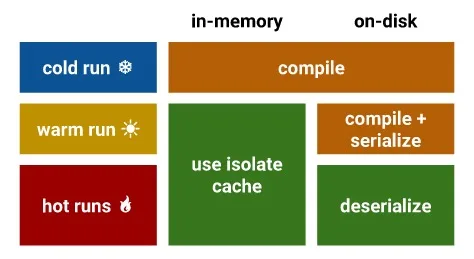
Image source: V8 blog
Code caching is divided into three levels: cold, warm, and hot.
-
When the user requests a JS file for the first time (the cold run), Chrome downloads the file and hands it to V8 for compilation, and caches the file to disk.
-
When the user requests this JS file a second time (the warm run), Chrome fetches the file from the browser cache and hands it to V8 for compilation again. After the compilation in the warm run stage is completed, the compiled code is deserialized and attached to the cached script file as metadata.
-
When the user requests this JS file a third time (the hot run), Chrome fetches the file and the metadata from the cache and hands both to V8. V8 skips the compilation phase and deserializes the metadata directly.
Comments
Sign in with GitHub to leave a comment. View discussions on GitHub ↗