Front-End Data Collection and Tracking
I’ve recently been reading Zhang Yunlong’s articles, and one of the lines goes like this.
In fact, this is not the first time I have come across this line. At the 12th D2 conference the year before last, there was a session titled “Taking a Monitoring System to the Extreme”, which claimed that “two lines of code are enough to build a real-time front-end monitoring platform”.
// 前端
window.onerror = function (a, b, c, d, e) {
  ;(new Image).src = `/m?p=${location.href}&a=${a}&b=${b}&c=${c}&d=${d}&e=${e.stack}`
}

// 服务端
tail -f access.log | awk '/m/ { c++; print c, $0} {}'
Unfortunately, at the time I was too inexperienced to understand why this worked.
Data Collection
Collection Technique No. 1 — Image Beacon
Although Yunlong’s article was published four years ago and the 12th D2 conference was two years ago, to this day the new Image approach is still common practice in the industry.
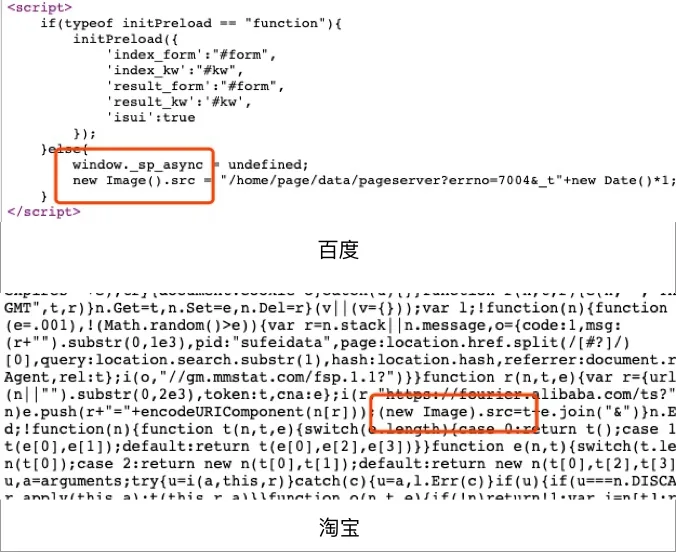
This approach goes by a term: Image Beacon, which translates back as “image beacon”.
What are the advantages of this approach?
- No cross-origin issues
- Does not consume the per-domain request quota
- Does not block page loading
- The commonly used 1x1-pixel GIF is only 43B, and you can even return 204 No Content directly to save on network request costs
- You get a complete HTTP request and response (you can listen for the onerror or onload events)
Collection Technique No. 2 — Web Beacon API
The navigator object provides sendBeacon, an API dedicated to data collection. This method is asynchronous and non-blocking, which minimizes resource contention with other critical operations. At present, Google Analytics is already using this approach.
Using it is very simple.
navigator.sendBeacon('/log', data);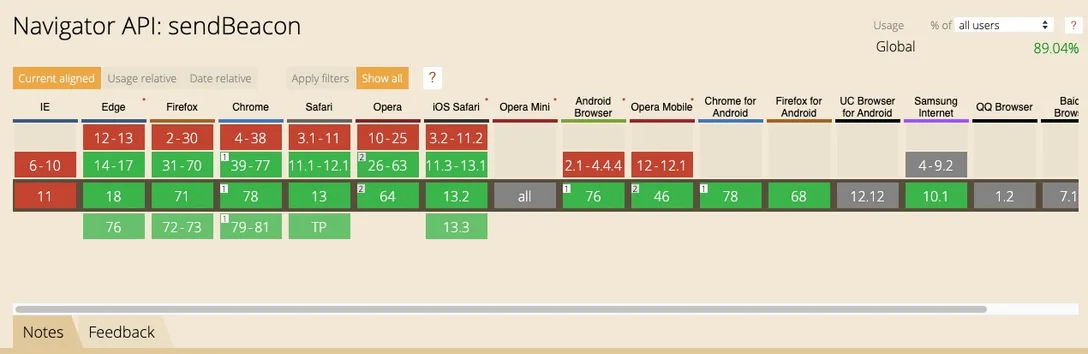
According to CanIUse, this API is only supported on iOS 11.2 and Android 4.4.4 and above. This is a relatively strict requirement, so a fallback strategy is needed when adopting this approach.
Tracking
Tracking Technique No. 1 — Manually Triggered Reporting
This one is easy to understand: you call the send API of a data collection SDK or library to send the data directly.
The advantage of “manually triggered reporting” is precise control, plus it makes it easier to customize the content being reported. Of course, its drawbacks are just as obvious: every tracking point requires additional code, it is highly intrusive, and updating the tracking scheme is costly.
Tracking Technique No. 2 — Tag-Based Tracking
“Tag-based tracking” usually relies on HTML data-* attributes, and its biggest difference from “manually triggered reporting” lies in how intrusive it is.
This is a very common pattern; for example, on the Taobao homepage you can find plenty of HTML tags with the data-spm attribute.
For instance, in the example below, the SDK can centrally handle all the data-higo-* attributes.
<div data-higo-goods="111"></div>
<div data-higo-goods="222"></div>
<div data-higo-collection="333"></div>
<div data-higo-video="111"></div>
Essentially, the business code is moved into the SDK, which reduces the intrusion somewhat.
Tracking Technique No. 3 — Codeless Tracking
The core idea of the codeless approach is to collect as much interaction data as possible, and then configure on a data analytics platform which data needs to be analyzed in the system.
This approach solves the data “backtracking” problem: because all the data used for analysis is fully collected from the very beginning, no matter how you adjust the metrics afterwards, the changes can be applied to the earlier data. This is something the other tracking approaches do not offer.
The flaws of this approach are just as obvious: since more information is collected, it will take up more transmission bandwidth. At the same time, it cannot flexibly support custom properties.
There is one thing Yunlong said that I particularly agree with.
Performance issues are always an engineering problem and a statistics problem.
And statistics is exactly what we are currently missing. I look forward to us having a more comprehensive front-end monitoring system.
Comments
Sign in with GitHub to leave a comment. View discussions on GitHub ↗